
Last updated: May 2026 | Reading time: 10 min | Category: Safety & Emergency
Key Takeaways
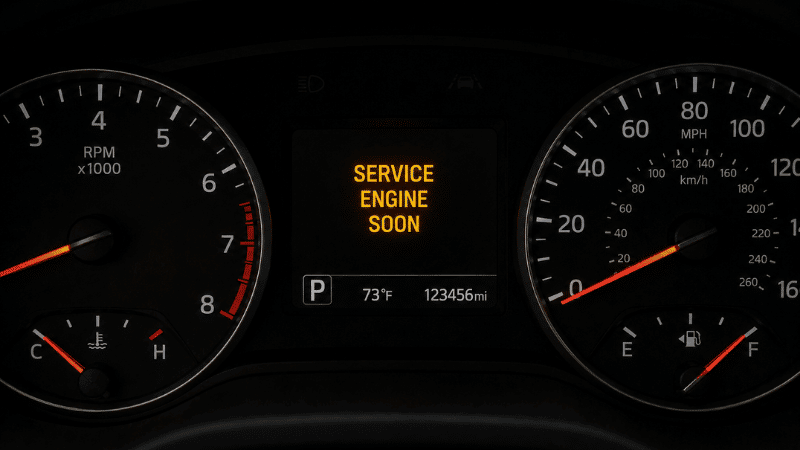
- “Service Engine Soon” and “Check Engine” are not always the same light — on most vehicles they mean different things, but on many GM vehicles (Chevy, Buick, GMC, Cadillac) they are literally the same light with different text
- The Service Engine Soon light is typically a scheduled maintenance reminder — oil change, air filter, transmission service — not an emergency
- You can keep driving when the Service Engine Soon light comes on, but don’t ignore it indefinitely — the service it’s requesting exists to prevent larger problems
- If your car is a GM vehicle and the light says “Service Engine Soon,” treat it like a Check Engine light and read the fault code before assuming it’s just a reminder
- You can reset most Service Engine Soon lights yourself through the instrument cluster menu — no tools needed on most modern vehicles
The Light That Looks Like a Problem But Usually Isn’t
You walk to your car in the morning, start it up, and there it is on the dashboard: “Service Engine Soon.” Four words, bright orange or yellow, and immediately your mind goes to worst-case scenarios. Is the engine failing? Is something about to break? How much is this going to cost?
Here’s the answer most of the time: nothing is broken. Your car is telling you it’s time for scheduled maintenance — usually an oil change, sometimes an air filter, occasionally a transmission fluid service. The light exists because modern vehicles track service intervals electronically and need a way to notify you when you’ve hit the threshold.
But — and this is important — there’s a version of this light that genuinely does warrant more attention, and most guides don’t explain the distinction clearly. The confusion comes partly from naming conventions that vary by manufacturer, and partly because one major brand uses the “Service Engine Soon” text for something completely different.
This guide explains exactly what your specific light means, what to do in the next 24 hours, and how to reset it yourself once you’ve taken care of what it’s asking.
Service Engine Soon vs. Check Engine Light — The Real Difference
On most vehicles, these are two distinct lights with two distinct meanings:
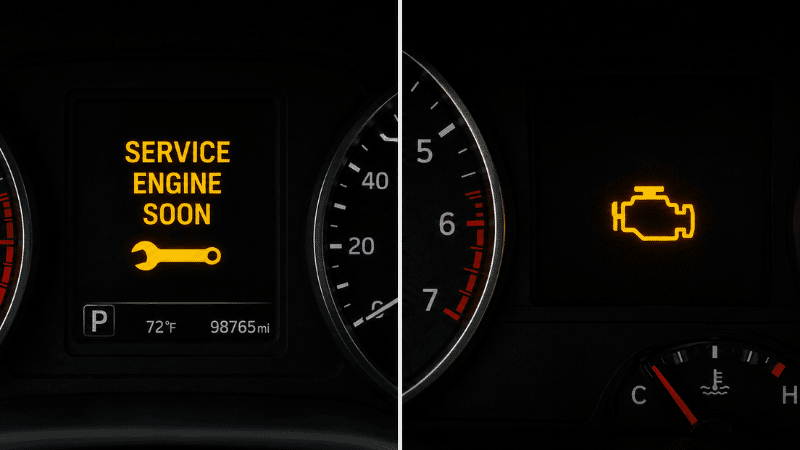
Service Engine Soon (on most vehicles): A scheduled maintenance reminder. Your car’s computer has been tracking mileage or time since the last service and has hit the interval you (or the factory) programmed. Nothing is currently wrong with the engine. This is the equivalent of a calendar reminder saying “haircut overdue.”
Check Engine Light: An active fault code has been stored by the engine management system. Something is currently operating outside normal parameters — a sensor reading incorrectly, an emission system fault, a component failing. This requires diagnosis, not just a service appointment.
The visual difference on most vehicles:
- Service Engine Soon: Typically displays the actual text “SERVICE ENGINE SOON,” “SERVICE REQUIRED,” “MAINT REQD,” or similar. Sometimes accompanied by a wrench icon.
- Check Engine Light: Typically displays an engine outline icon (sometimes with a lightning bolt), or the text “CHECK ENGINE.”
The GM Exception — This Is Where Most Confusion Comes From
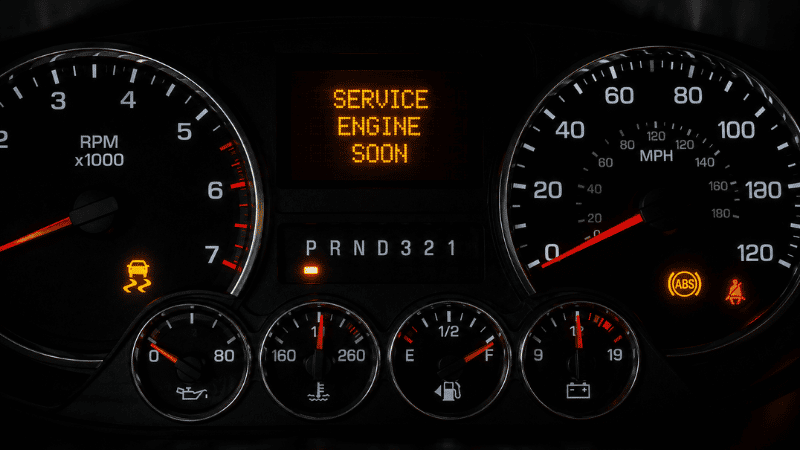
If you drive a General Motors vehicle — Chevrolet, Buick, GMC, Cadillac, or older Pontiac/Oldsmobile — the “Service Engine Soon” light is not a maintenance reminder. On GM vehicles, “Service Engine Soon” is the Check Engine light. GM chose to use this text instead of the engine icon that most other manufacturers use, but it functions identically: it means a diagnostic fault code has been stored and something needs investigation.
This is the most important thing to know about this topic: if you drive a GM vehicle, treat a “Service Engine Soon” light exactly the same way you would treat a Check Engine light on any other car. Don’t assume it’s just an oil change reminder. Read the fault code.
What Triggers the Service Engine Soon Light
On vehicles where it’s a maintenance reminder (non-GM), the light typically comes on because of:
Oil change interval: The most common trigger. Modern vehicles track oil life through an algorithm that considers mileage, engine temperature cycles, cold starts, and driving patterns — not just mileage alone. When the oil life percentage drops to 5–10% (varies by manufacturer), the light activates.
Air filter service: Some vehicles (particularly certain European brands) track air filter life and alert at replacement intervals.
Transmission fluid service: Scheduled based on mileage milestones.
Spark plug replacement: At high-mileage intervals (typically 30,000–100,000 miles depending on plug type).
Tire rotation reminder: Some vehicles track rotation intervals and alert through this system.
Annual service: Some vehicles (especially European brands like Mercedes-Benz with their “Service A/Service B” system, and BMW with their Condition Based Service) use this light to indicate a comprehensive scheduled service is due, combining multiple items into one notification.
Can You Drive With the Service Engine Soon Light On?
Yes — with one important conditional.
If your vehicle is not a GM model, and if the light came on without any accompanying symptoms (the car drives normally, no unusual sounds, no other warning lights), the Service Engine Soon light is a maintenance reminder and you can drive normally. Schedule the appropriate service within the next week or two. You’re not risking immediate damage, but you are delaying maintenance that protects the engine long-term.
The time factor matters though. If the light has been on for:
- Less than 2 weeks: Schedule service soon, no urgency today
- 2–4 weeks: Schedule service this week
- More than a month: You’re past the recommended interval; get it done
When to treat it as more urgent:
- You drive a GM vehicle (Chevy, Buick, GMC, Cadillac) — read the fault code
- The light came on along with any other warning lights
- The car is driving differently than usual (rough idle, hesitation, loss of power)
- You hear unusual sounds that weren’t there before
Any of these combinations means the light may not be a simple maintenance reminder — use an OBD2 scanner to check for fault codes before assuming routine service is all that’s needed.
How to Tell What Your Light Is Actually Asking For
The light itself tells you it’s time for service, but not always which service. Here’s how to find out:
Step 1: Check the Instrument Cluster Menu
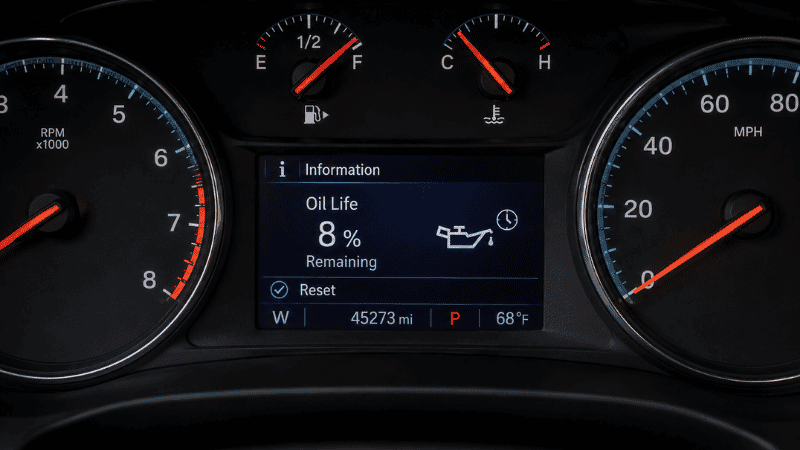
Most modern vehicles (2010 and newer) have a multi-information display or menu accessible through buttons on the steering wheel or instrument cluster. Navigate to the maintenance section — it typically shows oil life percentage, the specific service items that are due, and in some cases the mileage until the next service.
This is the fastest way to know exactly what triggered the light without any tools.
Step 2: Check the Oil Life Monitor Specifically
Even without navigating menus, most vehicles will show remaining oil life percentage somewhere in the instrument cluster. If it reads below 15%, the light was almost certainly triggered by oil life.
Step 3: Use an OBD2 Scanner
If you can’t determine the cause from the instrument cluster menu, or if you drive a GM vehicle, plug in an OBD2 scanner. On non-GM vehicles, the Service Engine Soon light typically doesn’t store OBD2 fault codes — it uses a separate maintenance reminder system. On GM vehicles, it will store codes just like a Check Engine light.
For non-GM vehicles: If no fault codes are present, it’s a maintenance reminder. For GM vehicles: Whatever codes are stored tell you exactly what the system detected.
Basic OBD2 scanners ($20–$30) read engine codes. Enhanced scanners ($40–$60) access additional systems.
What the Service Engine Soon Light Means on Specific Brands
General Motors (Chevy, Buick, GMC, Cadillac): “Service Engine Soon” = Check Engine light. Fault codes are stored. Read with an OBD2 scanner. Treat with the same urgency as any Check Engine light situation.
BMW: Uses “Service Engine” or condition-based service indicators. The system monitors actual component wear and driving conditions rather than fixed mileage intervals. When the light appears, the display typically shows which services are due (oil, brake fluid, microfilter, etc.).
Mercedes-Benz: Uses “Service A” and “Service B” designations, each covering different maintenance items. Service A is typically every 10,000 miles or one year (oil, filters, inspection). Service B is every 20,000 miles or two years and includes brake fluid and additional inspections.
Toyota/Lexus: “MAINT REQD” light for oil changes (triggers at oil life intervals). Separate Check Engine light for fault codes. These are distinct systems.
Honda/Acura: “Maintenance Minder” system with oil life percentage and letter/number codes indicating which services are due (A = oil change, B = oil + inspection, 1 = tire rotation, etc.).
Ford/Lincoln: “Oil Change Required” or “Change Engine Oil Soon” for oil life reminders. Separate Check Engine indicator. Generally clear distinction between the two.
Volkswagen/Audi: Countdown to service in the instrument cluster (e.g., “Service Due in 2,500 miles”). Service indicator wrench light appears when due. Separate Check Engine malfunction indicator lamp (MIL).
How to Reset the Service Engine Soon Light
Once you’ve completed the service the light was requesting, the light needs to be reset. Many shops do this automatically, but if you’ve done the service yourself or the shop forgot, here’s how to do it.
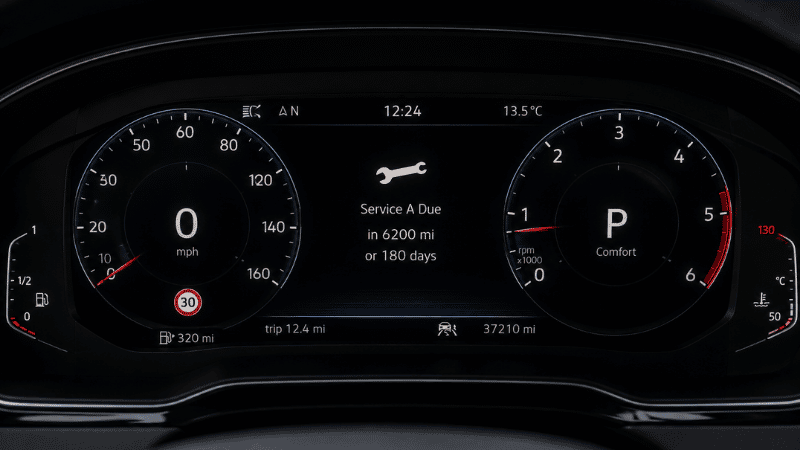
Method 1: Instrument Cluster Reset (Most Common)
This works on most modern vehicles without any tools:
- Turn the ignition to the “On” position (without starting the engine) — on push-button start cars, press the start button once without pressing the brake
- Navigate to the maintenance or oil life section in the instrument cluster menu using the steering wheel buttons
- Find the “Reset” option and hold the OK/Select button for 3–5 seconds until the oil life resets to 100% or the service indicator clears
- Start the vehicle and verify the light is gone
The exact button sequence varies by manufacturer and model year — check your owner’s manual for your specific vehicle. Most manufacturers include reset instructions in the manual.
Method 2: Ignition Cycling (Older Vehicles)
On older vehicles without a menu-based reset:
- Turn the ignition to “On” without starting (key to the second position)
- Press the accelerator pedal to the floor slowly three times within 10 seconds
- Turn the ignition off
- Start the vehicle — the light should be gone
This method works on many older GM, Ford, and Toyota vehicles but varies by year and model.
Method 3: OBD2 Scanner Reset
Any OBD2 scanner with a “reset” or “clear codes” function can reset the service light on GM vehicles (since it’s a fault-code-based system). For maintenance reminder lights on other vehicles, some scanners have a dedicated oil reset function — check your specific scanner’s capabilities.
Method 4: Battery Disconnect (Last Resort)
Disconnecting the negative battery terminal for 15–30 minutes clears the vehicle’s computer memory, including the service reminder. This method also resets other learned settings (radio presets, idle adaptation, TPMS registration) and triggers multiple warning lights for a drive cycle or two while the system relearns. Use this only if other methods don’t work.
What Happens If You Keep Ignoring It
The Service Engine Soon light as a maintenance reminder won’t cause your car to stop running if ignored for a few weeks. But the maintenance it’s reminding you of exists for a reason.
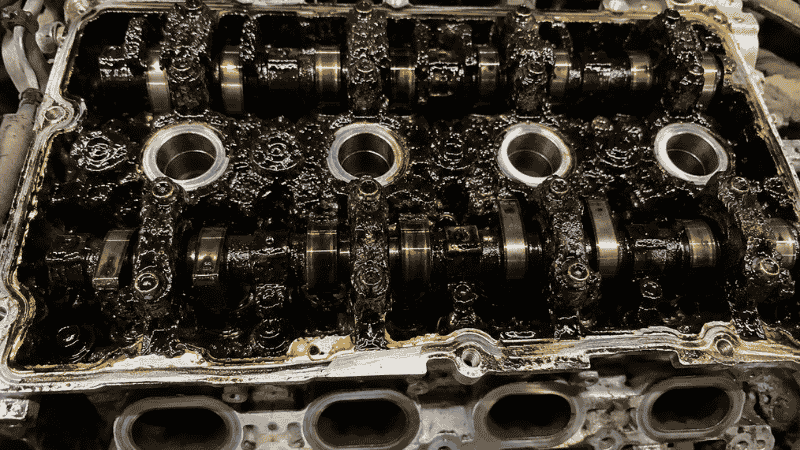
Ignored oil change: Oil degrades and becomes contaminated, losing its lubricating properties. Eventually leads to increased engine wear, sludge formation, and in severe cases engine failure. The oil change reminder exists because running degraded oil costs you engine life.
Ignored air filter: A clogged engine air filter reduces airflow to the engine, decreasing fuel economy and engine performance. Eventually causes the engine to run rich (too much fuel relative to air) which can trigger a Check Engine light and increase emissions.
Ignored transmission fluid: Degraded transmission fluid loses its lubricating properties and heat resistance. Transmission wear accelerates. What would have been a $150 fluid service can become a $2,000–$5,000 transmission rebuild.
The maintenance the light is requesting is almost always cheap relative to the damage that results from ignoring it. The light exists precisely to catch these things before they become expensive.
FAQ
What does the service engine soon light mean? On most vehicles, it’s a scheduled maintenance reminder — typically for an oil change, air filter, or another interval-based service. The car’s computer has tracked mileage or time since the last reset and hit the programmed threshold. On GM vehicles (Chevy, Buick, GMC, Cadillac), however, “Service Engine Soon” is the Check Engine light and means a fault code has been stored.
Is service engine soon serious? On non-GM vehicles: usually not immediately serious. It’s a maintenance reminder, not an emergency. Schedule service within the next week or two. On GM vehicles: treat it like a Check Engine light — read the fault code first before assuming it’s routine maintenance.
Can I drive with service engine soon light on? Generally yes, for a short time. If the car is driving normally with no other warning lights, you can drive to a scheduled service appointment. Don’t ignore it for weeks or months — the maintenance it’s requesting prevents larger problems. If any symptoms accompany the light (rough running, unusual sounds, other dashboard lights), check it sooner.
How do I reset the service engine soon light? Most modern vehicles reset through the instrument cluster menu — navigate to the maintenance or oil life section and hold the reset button. On older vehicles, a key-cycling method often works. On GM vehicles, an OBD2 scanner can clear fault codes. Always complete the actual service first — resetting without servicing just delays the light coming back.
Why does my service engine soon light keep coming back? If the light comes back shortly after being reset without service, the interval has been hit again. If it comes back shortly after completing service, either the reset wasn’t completed properly or there’s an underlying fault code (especially on GM vehicles). Read the OBD2 codes to determine which situation applies.
What is the difference between service engine soon and check engine light? On most vehicles: Service Engine Soon = maintenance reminder (scheduled oil change, filter, etc.). Check Engine = active fault code requiring diagnosis. On GM vehicles: both terms refer to the same light with the same meaning — a fault code has been stored and investigation is needed.
How long can I drive with the service engine soon light on? As a maintenance reminder on non-GM vehicles: 1–2 weeks maximum before you risk letting the maintenance interval slip too far. On GM vehicles: treat it with more urgency — get an OBD2 scan within a few days to identify the fault code, as you may have a real issue developing.
What’s Next
Now that you know what your service engine soon light is actually telling you, these guides cover the systems it most commonly relates to:
- How to do an oil change — the most common trigger for the service engine soon light; whether to DIY or go to a shop, and the real cost breakdown. (→ How to Do an Oil Change)
- Car dashboard symbols — the complete guide to every warning light color and what to do when any light appears. (→ Car Dashboard Symbols Explained)
- Car maintenance checklist — where oil changes, air filters, and transmission service fit in a complete annual maintenance schedule. (→ Car Maintenance Checklist)
- How to check car fluids — monthly fluid checks prevent most of the conditions that trigger warning lights in the first place. (→ How to Check Car Fluids)
A car that tells you when it needs service is doing you a favor. The drivers who benefit most are the ones who respond promptly — every time.
References
- Society of Automotive Engineers (SAE) International — SAE J1979: E/E Diagnostic Test Modes, OBD-II standard defining fault code storage and retrieval protocols
- National Highway Traffic Safety Administration (NHTSA) — Vehicle On-Board Diagnostic Systems, consumer guidance on OBD-II requirements and malfunction indicator lamp standards
- U.S. Environmental Protection Agency (EPA) — On-Board Diagnostics (OBD): Questions and Answers, malfunction indicator lamp requirements and reset procedures
- General Motors Service Information — Malfunction Indicator Lamp Designation, GM-specific “Service Engine Soon” light technical reference
This article contains affiliate links. AutoIXPro may earn a small commission on purchases through our links at no extra cost to you. All recommendations are based on genuine research and practical value. See our Affiliate Disclosure for details.
Question about your specific vehicle’s service light? Contact us — we read every message.